
 Use the Out of Vehicle Charge function to diagnose a battery not installed and connected in a vehicle.
At any time during the test, tap  to return to the previous screen; or
  to return to the Main Menu.
Battery Test
- Connect the diagnostic clamps to the appropriate battery posts.
- At the Main Menu, tap Out of Vehicle Charge. The Edit Battery Information screen is displayed.
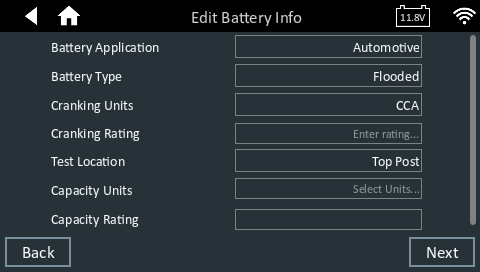
3. Tap the box across from each displayed parameter and select the correct information from the displayed list.
4. Tap Next to begin the Battery Test or Reset to return to the default settings.
The charger performs a series of tests to determine the overall condition of the battery before applying a charge. Those steps include measuring the ambient battery temperature, Cranking Health, Reserve Capacity, Charge Acceptance, and applying a Load Test to the battery.
The test results are then displayed on the charger screen.
Battery Test Results
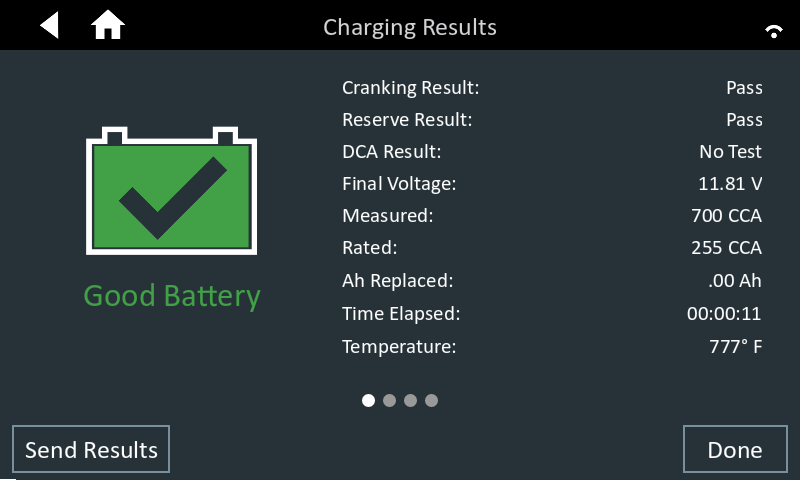
Swipe the screen to review the sub-decisions for Cranking, Reserve Capacity and Charge Acceptance.
NOTE: Refer to the Test Results Decision Tables article for a complete definition of possible test results.
To send the test to a configured printer or via email, tap Send Results and select an option. To return to the Home Screen, tap Done or to return to the Main Menu.